Self-Hosting : The Foundation
An overview of my current selfhosting setup. Which services are used and a glimpse into some of the non-obvious configurations

This post and surely subsequent posts are intended to serve as a sort of narrative documentation for myself, but getting thoughts and ideas out on digital paper never hurt to identify good, bad or crazy ideas.
After lurking the selfhosted subreddit and making heavy use of Docker and service orchestration tools at work, it was a natural extension to start doing this at home. To begin, my goal has been to offload some low priority workloads from online solutions to open source, self-hostable solutions. Below, I will outline the stack and then start to highlight some of the non-obvious configuration(s).
Software Stack
Build and Deploy - Komodo
Dashboard / Entry Page - Homepage
Reverse Proxy - Traefik
Authentication - Pocket ID
Services
Komodo
This service has proven highly useful to manage compose files, container versions, build management for custom containers, check up-time, etc. As cool as managing everything in a series of terminal windows looks, sometimes having a GUI to click around and view just makes things easier to parse and manage.
Homepage
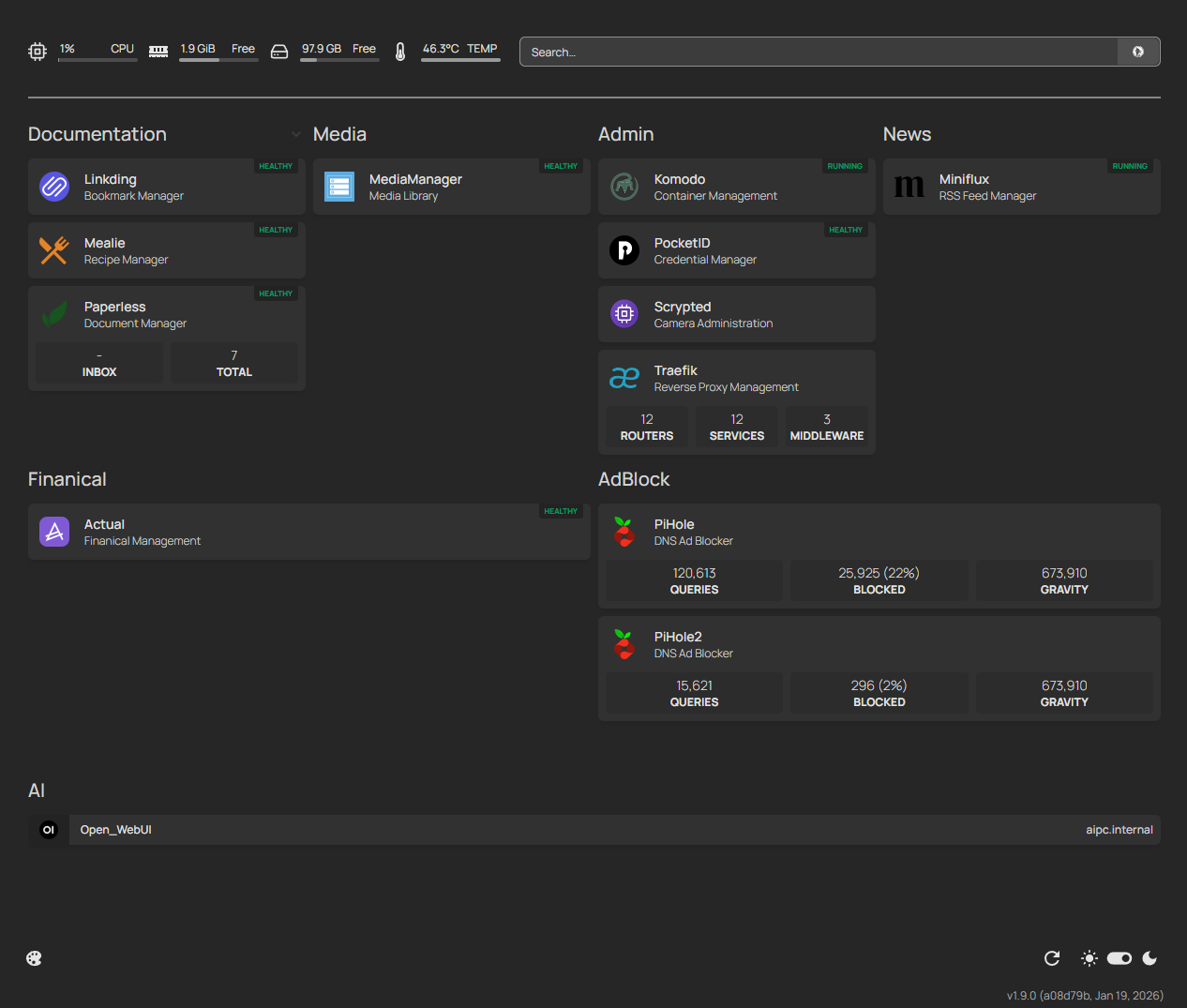
Along the same lines of using Komodo to see everything in one location, a dashboard has proven helpful to see all hosted apps in one location where I can navigate directly to their UIs. While each service has an easy to remember URL, which I'll explain later, visually seeing all the 'options' helps me navigate and remember what is currently online.
Additionally, homepage supports the use of Docker labels to have services show up. An example from my Miniflux service is:
labels:
      - homepage.group=News
      - homepage.name=Miniflux
      - homepage.icon=miniflux.png
      - homepage.href=https://miniflux.domain.duckdns.org
      - homepage.description=RSS Feed Manager
Traefik
Several alternatives exist for reverse-proxy use cases, but I was drawn to Traefik for its support of configuration through docker labels. I'm sure others have this same functionality, but Traefik always showed up first.
These labels allow me to configure a new stack (Komodo language for compose project), add the following labels, and the application will get a valid SSL cert, be routable through a logical sub domain and enabled within Traefik.
Miniflux label example for Traefik:
labels:
      - "traefik.enable=true"
      - "traefik.http.services.miniflux.loadbalancer.server.port=8080"
      - "traefik.http.routers.miniflux.rule=Host(`miniflux.domain.duckdns.org`)"
      - "traefik.http.routers.miniflux.entrypoints=websecure"
      - "traefik.http.routers.miniflux.tls.certresolver=duckdns"
      - "traefik.http.routers.miniflux.tls=true"
Pocket ID
At first, I simply used username and password authentication for every service. While easy, it got rather annoying typing in the password each time I access the service. To streamline this, I chose Pocket ID for its Passkey and OIDC functionality. It does not seem as well documented or adopted as Keycloak, Authentik or similarly popular options. Thankfully, deploying OIDC authentication is pretty much the same regardless of service.
Subdomain Configuration
To allow me to navigate to my services using a friendly URL and obtain a valid SSL cert, I am using a combination of Traefik and Duck DNS.
To start, I configured a domain in Duck DNS following their instructions. This provides a URL like domain.duckdns.org which routes to my public IP address. Doing so enables the ability to get a valid SSL certificate, even though the services are hosted on my LAN.
Configuring Traefik to use Duck DNS as my certificate resolver was as simple as adding this to the traefik.yml (or container labels, however you manage the config)
certificatesResolvers:
  duckdns:
    acme:
      email: email@email.com
      storage: /letsencrypt/acme.json
      dnsChallenge:
        provider: duckdns
        delayBeforeCheck: 0
Then, when I commission a new service, I add the Traefik labels to the service as shown above under 'Traefik', making sure to replace the 'domain' with the name configured in Duck DNS.
Lastly, adding a local DNS entry in my Pi-Hole to route miniflux.domain.duckdns.org to the server hosting the services within my LAN completes the solution.
Next Topics
As I continue down the self-hosting journey, here are some additional topics I plan to explore.
Organizing Homepage Dashboard
Currently, since I user Docker labels to populate the homepage, I don't have much say in the organization of how services are organized and laid out on the homepage (beyond defining the 'bucket'). Looking into the ordering feature of Homepage will likely solve this.
Proper Backup Solution
At the moment, I push compose projects (stacks) to my Gitea repository for service-level backups. Beyond that, I have Restic configured to push backups to Backblaze on a manual basis, which is not ideal. Moving forward, I plan to automate the restic backups and perform a test restore to make sure it works as expected.
Controlled, External Access
Having all of these services available on my LAN is great and all, but I sometimes need to access them remotely. Whether that be Mealie to see recipe ingredients, my media tracker to see what DVDs or other media I already have, or similar use case. I have played around with Tailscale, which can be rather straight forward to implement. Unfortunately, my usage, as outlined above, of Traefik and PiHole seems to be a rather complicated implementation.